Master Roadmaps vs. Scenario Planning: How to Plan for Multiple Futures Without Losing Your Mind


Your CFO sends an email at 4 PM on Friday: “Board is concerned about burn rate. Model a 30% budget cut scenario for Monday’s leadership meeting. Show what we can still deliver with reduced headcount.”
You spend the weekend copying your carefully-planned roadmap into a new spreadsheet, manually removing 30% of squad capacity, shuffling allocations to see what fits, updating timelines, recalculating quarterly metrics. By Sunday night you have a “Budget Cut Scenario” spreadsheet that’s already out of sync with the master roadmap because two product managers made allocation changes Friday afternoon that you don’t know about yet.
Monday morning you present the scenario. Leadership decides not to implement the cut after all—market conditions improved over the weekend. Your scenario work is now useless. Worse, you’re not entirely sure which changes you made belong to the scenario versus the master plan, so you spend Tuesday reconciling spreadsheets trying to recover the original master roadmap state.
This scenario planning nightmare happens in product organizations constantly. Leadership needs to explore “what if” alternatives—what if the acquisition closes, what if we pivot to enterprise, what if we cut this initiative, what if we double down on that market. These strategic questions are legitimate and important. The problem is that most roadmap tools make scenario planning so painful that teams either don’t do it (and make strategic decisions without exploring alternatives) or do it badly (in spreadsheets that immediately diverge from source-of-truth systems).
Scenario planning shouldn’t destroy your master roadmap. It shouldn’t create version control chaos. And it definitely shouldn’t require manual spreadsheet hell every time leadership asks “what if?”
Why You Need One Source of Truth Plus Exploration Space
Effective roadmap planning requires two apparently contradictory capabilities: a single source of truth that everyone trusts represents the current plan, and the ability to explore alternative futures without contaminating that source of truth.
The source of truth answers: “What are we actually building? Which squads are working on which objectives during which sprints? What are we committing to ship this quarter?” This is the master roadmap—the plan that teams execute against, stakeholders communicate about, and leadership uses for board presentations and strategic communications. Building this roadmap from business outcomes rather than features is why we recommend starting with OKRs for Product Teams .
There can only be one master roadmap per planning period. If two different versions claim to be “the plan,” nobody knows which allocations are real, which commitments are valid, or which strategic priorities actually matter. Teams need a single, authoritative answer to “what should I work on next sprint?”
But strategic planning also requires exploration space for “what if” questions that leadership must answer before making major decisions. What if we shift 40% of engineering capacity to the enterprise product line—what becomes possible in enterprise, and what do we give up in the consumer product? What if the acquisition closes and we inherit three more engineering teams—how should we reallocate objectives to capitalize on increased capacity? What if regulatory changes require compliance work that consumes 25% of capacity for two quarters—which product initiatives get delayed?
These questions can’t be answered with the master roadmap alone because exploring them requires making temporary changes (reallocating squads, adjusting timelines, cutting initiatives) that you don’t want to commit to until the strategic decision is made. You need exploration space where you can model alternatives, compare trade-offs, and present options to leadership without destroying the current plan teams are executing against.
The challenge is creating this exploration space without drowning in version control chaos.
The “Too Many Versions” Problem
Many teams try to solve scenario planning by copying roadmaps into multiple files, sheets, or tool instances labeled things like “Roadmap - Master,” “Roadmap - Budget Cut Scenario,” “Roadmap - Enterprise Focus,” “Roadmap - Acquisition Integration,” and so on.
This approach fails catastrophically for several predictable reasons.
First, copied roadmaps immediately diverge. Someone updates an allocation in the master roadmap. Nobody remembers to update the same allocation in all three scenario copies. Within days, the scenarios are out of sync with reality. Within weeks, they’re so outdated they’re useless for decision-making.
Second, it becomes unclear which version is actually the source of truth. Is “Roadmap - Q2 Final” the master, or was it “Roadmap - Q2 Updated” or “Roadmap - Q2 FINAL FINAL”? Different stakeholders reference different versions. Product managers don’t know which allocations teams should actually execute. Chaos reigns.
Third, comparing scenarios requires opening multiple files side-by-side and manually identifying differences. What changed between the enterprise-focus scenario and the current plan? Which squads moved? Which objectives got cut? You have to visually scan both files looking for differences rather than having a system that shows you exactly what changed.
Fourth, converting a scenario into the new master plan requires manually copying data from one file to another, risking copy errors, losing recent updates made to the old master, and creating confusion about which version is now authoritative.
This version control nightmare is why many teams abandon scenario planning entirely. It’s too painful, too error-prone, and too time-consuming. So instead, leadership makes strategic decisions without properly modeling alternatives, often discovering only after commitment that the new direction has unexpected consequences they would have caught if they’d modeled it properly.
Master Roadmaps: The Single Source of Truth
RoadmapOne solves this by introducing a formal distinction between master roadmaps and scenario roadmaps, with built-in version control and smart cloning that prevents the chaos of manual spreadsheet versioning.
Master roadmaps represent the official plan for a specific planning year. This is what teams are actually executing. This is what stakeholders should reference when asking “what are we building this quarter?” This is what goes into board presentations and strategic communications.
Each planning year can have exactly one master roadmap. No more, no less. This constraint eliminates the “which version is source of truth?” confusion entirely. If someone asks “what’s the plan for 2025?” the answer is unambiguous: the 2025 master roadmap.
Master roadmaps must be shared with the entire workspace. This ensures that everyone who needs to see the current plan can access it. There’s no scenario where the official plan is private to one person while teams execute blind to actual priorities.
Master roadmaps are marked with a distinctive “MASTER” badge in roadmap lists, making them immediately identifiable. When viewing the roadmap list for a workspace, the master roadmap for each planning year stands out visually, reducing the chance that someone accidentally opens a scenario thinking it’s the current plan.
Teams execute against the master roadmap. All sprint planning, capacity allocation, objective prioritization, and delivery coordination references the master roadmap. Scenarios exist for strategic exploration, but only the master roadmap drives actual execution.
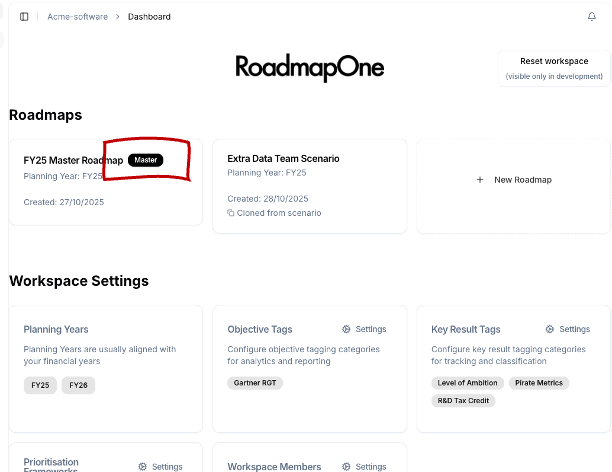 Master roadmaps display a distinctive badge in roadmap lists, making it immediately clear which roadmap represents the official plan teams are executing against.
Scenario Roadmaps: Exploring Alternatives Without Destroying the Master
Scenario roadmaps are what-if explorations that let you model alternative futures without contaminating the master roadmap. They answer strategic questions like “what would our roadmap look like if X happens?” where X might be budget cuts, strategic pivots, acquisitions, market changes, or any other event that would fundamentally alter planning priorities.
Unlike master roadmaps, you can create unlimited scenario roadmaps for any planning year. This makes sense because strategic planning often involves exploring multiple alternatives simultaneously. Leadership might ask you to model three different enterprise-focus scenarios with varying levels of capacity shift, two different budget-cut scenarios, and one acquisition-integration scenario—six scenarios total, all existing simultaneously without creating version control chaos.
Scenarios can be private or shared. Private scenarios let individual product managers or leaders explore ideas without exposing half-baked thinking to the entire organization. “I want to model what happens if we completely cut the mobile initiative—but I don’t want to alarm the mobile team until we’ve decided whether this is actually under consideration.” Private scenarios provide this exploration space.
Shared scenarios can be viewed by everyone in the workspace, making them useful for collaborative strategic planning. “We need to decide between enterprise focus and international expansion. Here are two scenarios modeling each option. Leadership team, please review both and we’ll discuss trade-offs in Friday’s meeting.”
Scenarios are full, independent copies of roadmaps with their own allocations, objectives, key results, and team structures. This means you can make radical changes to a scenario without any risk of affecting the master roadmap. Cut 40% of objectives? Fine. Reallocate every squad to different work? Go ahead. Delete entire teams? No problem. The master roadmap remains completely untouched.
This independence creates the psychological safety needed for true strategic exploration. Product managers can model aggressive scenarios, controversial pivots, and unpopular trade-offs without fear that their explorations will accidentally become real commitments or alarm teams who see the changes.
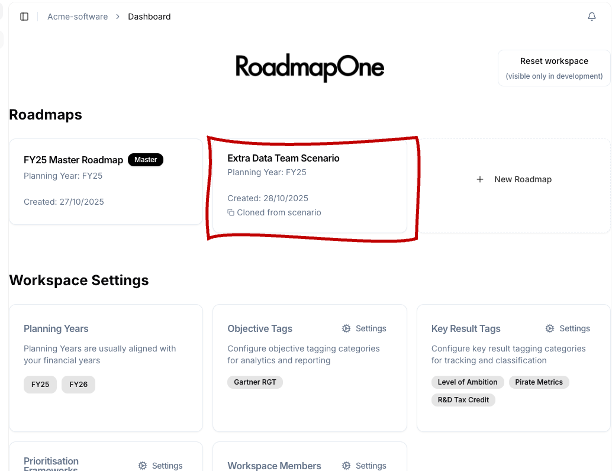 Scenario roadmaps appear in the roadmap list alongside the master, with visual indicators showing whether they’re private or shared, and which planning year they belong to.
Smart Cloning: Full Copy vs. Structure-Only
Creating scenarios requires starting from an existing roadmap—typically the master roadmap for the planning year you’re modeling. RoadmapOne provides smart cloning logic that understands the difference between cloning within the same planning year (creating a what-if scenario) versus cloning to a different planning year (creating next year’s master roadmap).
Same Planning Year: Full Deep Copy
When you clone a roadmap within the same planning year, you’re creating a scenario that explores an alternative version of the current plan. In this case, you want an exact copy of everything: all squads, all objectives, all allocations, all milestones, all sprint structures—a complete snapshot of the current state that you can then modify to explore the scenario.
RoadmapOne performs a full deep copy including teams and squad hierarchy, all objectives with their descriptions, tags, priorities, and key results, all sprint calendar entries with dates and quarters, all WIP capacity allocations showing which squads work on which objectives during which sprints, all milestones on team rows, all objective priorities and framework scoring.
This full copy creates a perfect starting point for scenario modeling. You’re not starting from scratch—you’re starting from current reality, then making specific changes to explore “what if this changed?”
For example, to model a budget-cut scenario, you clone the 2025 master roadmap (same planning year) into a new scenario called “2025 Budget Cut 30%.” This gives you an exact copy of the current plan. Then you reduce squad capacity by 30%, remove allocations that no longer fit, and adjust timelines for remaining objectives. The scenario now shows exactly what the roadmap would look like under budget constraints.
Different Planning Year: Structure-Only Copy
When you clone a roadmap to a different planning year, you’re typically creating next year’s master roadmap based on this year’s organizational structure and strategic objectives. In this case, you don’t want allocations or sprint-specific details from the current year—those are tied to specific calendar dates that don’t apply to the new planning year. What you want is the organizational structure (teams and squads) and strategic direction (objectives and key results) that will carry forward, while generating fresh sprint calendars and clean allocation slates for the new year.
RoadmapOne performs a structure-only copy including teams and squad hierarchy (your org structure), objectives with their descriptions, tags, and priorities, key results associated with objectives. It does NOT copy sprints (new planning year needs its own sprint calendar based on next year’s dates), allocations (next year’s work starts unallocated, allowing fresh planning), milestones (events are year-specific and don’t carry forward), objective priorities and scoring (frameworks might be reused, but scores start fresh).
This structure-only copy creates a clean foundation for next year’s planning. You’re not copying this year’s execution details that don’t apply to next year. You’re carrying forward organizational structure and strategic objectives that likely remain relevant, then planning fresh allocations for new sprint timelines.
For example, when planning for 2026, you clone the 2025 master roadmap to create “2026 Master Roadmap.” This copies your team structure (which probably doesn’t change radically year to year) and strategic objectives (many will remain relevant or evolve incrementally), but generates a fresh 2026 sprint calendar and doesn’t copy 2025’s allocations (which referenced 2025 sprints that don’t exist in 2026).
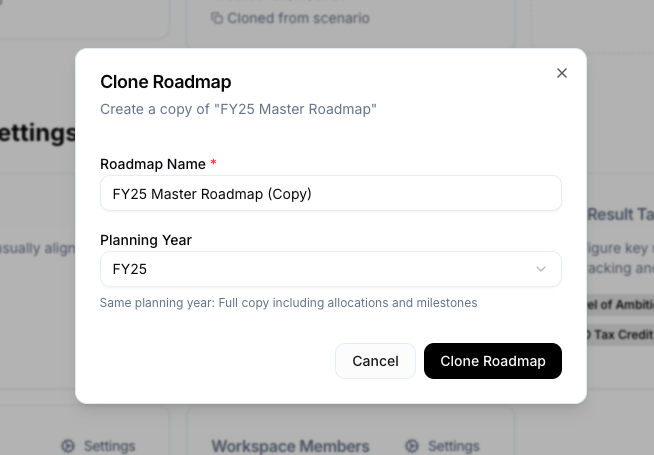 The roadmap cloning modal shows which planning year you’re cloning to and explains whether it will perform a full copy (same year) or structure-only copy (different year), preventing accidental copying of irrelevant data.
When to Create Scenario Roadmaps
Scenario roadmaps are valuable whenever strategic decisions require understanding how alternative choices would affect resource allocation, delivery timelines, or portfolio balance. Here are the most common scenarios (pun intended) where scenario planning prevents costly strategic mistakes.
Budget Cut Scenarios
Economic downturns, funding delays, or profitability pressures sometimes force organizations to reduce headcount or freeze hiring. Leadership needs to understand: if we cut capacity by X%, which initiatives can we still deliver, which must be delayed or canceled, and how do timelines shift?
Create a budget-cut scenario by cloning the master roadmap, reducing squad capacity to reflect the cut (fewer squad members or entire squads eliminated), removing allocations that no longer fit within reduced capacity, and recalculating delivery timelines for remaining objectives.
This shows leadership exactly what they’re giving up with the budget cut. Not vague assertions that “we’ll deliver less,” but specific initiatives cut, specific timeline delays, and specific strategic priorities that won’t get capacity. This makes budget cut decisions data-driven rather than emotional.
It also helps leadership calibrate the size of the cut. Maybe a 20% cut is tolerable because it only delays a few low-priority initiatives, but a 30% cut eliminates strategic priorities the board cares deeply about. Modeling both scenarios helps leadership choose the minimum necessary cut rather than cutting more than needed.
Strategic Pivot Scenarios
Companies pivot when market feedback, competitive pressure, or new opportunities suggest a fundamental shift in strategic direction. Leadership considers: if we shift from consumer to enterprise, from horizontal platform to vertical solution, or from geographic expansion to product depth, how would capacity reallocate and which objectives move to the forefront?
Create a strategic pivot scenario by cloning the master roadmap, redefining top-priority objectives to reflect the new strategic direction, reallocating squad capacity toward new priorities, and cutting or deprioritizing objectives that don’t align with the pivot.
For example, a company considering pivoting from B2C to B2B creates an “Enterprise Focus” scenario. They clone the current roadmap, create new enterprise-oriented objectives (SSO, RBAC, admin controls, audit logs), allocate heavy capacity to these enterprise features, and cut or delay consumer features that were previously high priority.
Comparing the enterprise-focus scenario to the current consumer-focused master roadmap makes the trade-offs explicit. Leadership sees exactly which consumer features get sacrificed, which timelines shift, and how the product portfolio evolves under the pivot. They can make an informed decision about whether the trade-offs are worth it rather than pivoting blindly and discovering the consequences mid-execution.
Acquisition Integration Scenarios
Acquiring another company often brings engineering teams, product capabilities, and strategic priorities that must be integrated into existing roadmaps. Leadership needs to plan: how do we integrate the acquired teams into our org structure, which of their product capabilities do we invest in, and which of our original initiatives should we pause to focus on integration?
Create an acquisition integration scenario by cloning the master roadmap, adding squads from the acquired company to the team hierarchy, creating objectives that represent integration work (API migrations, platform consolidations, user data migrations), and reallocating capacity between continuing existing work, building new acquired-product capabilities, and performing integration work.
This scenario helps leadership understand the opportunity cost of acquisition integration. Every squad working on integration work is a squad not working on original roadmap priorities. Modeling this explicitly prevents the common mistake of assuming acquired teams are “bonus capacity” that adds to existing roadmap throughput, when the reality is that integration work consumes capacity from both acquired and original teams, reducing total product delivery in the short term.
Compliance or Regulatory Requirement Scenarios
New regulations, industry certification requirements, or customer contractual obligations sometimes demand significant engineering effort that wasn’t in the original roadmap. Leadership needs to assess: if compliance work consumes X% of capacity for Y quarters, which product initiatives must be delayed?
Create a compliance requirement scenario by cloning the master roadmap, adding compliance-related objectives, allocating substantial capacity to compliance work (often 20-30% of total capacity for 1-2 quarters), and shifting product initiative timelines to accommodate reduced capacity for feature work.
For example, a company facing GDPR compliance creates a “GDPR Compliance Scenario” showing two squads fully allocated to compliance work for two quarters. Product initiatives scheduled for those quarters shift to later sprints. Leadership sees the exact delivery impact of compliance work and can decide whether to hire additional capacity, accept the timeline delays, or cut product initiatives entirely to maintain original timelines for the highest-priority features.
Market Opportunity Scenarios
Sometimes unexpected market opportunities emerge—a competitor exits the market, a new use case gains traction, a partnership opens new channels. Leadership needs to model: if we rapidly shift capacity to capitalize on this opportunity, what’s the impact on existing roadmap commitments?
Create a market opportunity scenario by cloning the master roadmap, creating new objectives representing the market opportunity, reallocating squad capacity toward opportunity-related work, and identifying which existing commitments must be delayed or canceled to make room.
These scenarios often have tight timelines—market windows close quickly. Having the ability to model capacity reallocation in hours rather than days enables better strategic decision-making about whether to chase the opportunity or maintain the current plan. This is another reason why understanding your true capacity through a grid-based capacity view is essential—you can’t model reallocation if you don’t know what capacity is available to reallocate.
Comparing Scenarios: Making Trade-offs Visible
The value of scenario planning isn’t just creating scenarios—it’s comparing them to understand trade-offs and make informed strategic decisions.
RoadmapOne enables scenario comparison through several mechanisms that make differences explicit rather than requiring manual visual scanning.
Side-by-side grid view lets you open the master roadmap and a scenario roadmap simultaneously, displaying them in split view. Squads align vertically, sprints align horizontally, making it immediately obvious where allocations differ. A squad allocated to Objective A in the master might be allocated to Objective B in the scenario—the visual difference jumps out.
Analytics comparison shows portfolio balance differences between roadmaps. The master roadmap shows 60% Run work, 30% Grow, 10% Transform. The enterprise-focus scenario shows 45% Run, 40% Grow, 15% Transform. This quantitative comparison reveals how the scenario shifts strategic balance across the portfolio.
Objective-level differences show which objectives gained or lost capacity, which moved earlier or later in the timeline, and which were added or removed entirely. The master roadmap allocates eight squad-sprints to mobile features. The budget-cut scenario allocates zero squad-sprints (mobile features were cut). The comparison highlights this clearly.
Timeline impact view shows how delivery timelines shift between scenarios. In the master roadmap, Objective X ships in Q2. In the enterprise-focus scenario, Objective X ships in Q4 because capacity was reallocated to enterprise priorities. Stakeholders can see exactly which features delay and by how much under each scenario.
These comparison capabilities transform scenario planning from abstract strategic discussion to concrete trade-off analysis supported by data. Instead of “maybe we should focus more on enterprise,” you have “here’s exactly what focusing on enterprise means: these five consumer features delay by two quarters, enterprise features ship six weeks earlier, and portfolio balance shifts from 30% Grow work to 40% Grow work.”
Converting Scenarios to Master: Making Decisions Real
Scenarios exist for strategic exploration, but eventually decisions get made and scenarios must convert into reality. RoadmapOne provides explicit scenario-to-master conversion that maintains data integrity while preventing version control chaos.
The Conversion Process
When leadership decides to adopt a scenario as the new official plan, you mark that scenario as the new master roadmap through an explicit conversion action. RoadmapOne prompts confirmation (because this is a significant change), verifies that only one master exists per planning year (moving the current master to scenario status), and atomically converts the scenario to master status while downgrading the old master to a scenario labeled with timestamp and reason (e.g., “2025 Master - Before Budget Cut - 2025-03-15”).
This conversion is clean, auditable, and reversible. Clean because it’s a single action rather than manually copying data between files. Auditable because the old master is preserved as a timestamped scenario, maintaining history of what the plan was before the strategic decision. Reversible because if leadership changes their mind, you can convert the old master scenario back to master status, restoring the previous plan.
Preserving History
When you convert a scenario to master, the previous master doesn’t disappear—it becomes a historical scenario that preserves what the plan was before the strategic change. This historical preservation serves several important purposes.
It enables rollback if the strategic decision gets reversed. Leadership adopts the enterprise-focus scenario, demoting the consumer-focused master to a scenario. Two months later, market feedback suggests the enterprise pivot isn’t working. You can convert the consumer-focused scenario back to master, effectively rolling back the strategic change.
It provides historical context for retrospectives and post-mortems. Six months after a strategic pivot, teams can compare what actually shipped to what was originally planned before the pivot, understanding how strategic decisions affected delivery outcomes.
It documents decision points for new team members or stakeholders who join after the strategic change. “Why aren’t we investing in mobile anymore?” “Here’s the master roadmap from March 2025 before the budget cut—you can see mobile was a priority then. Here’s the budget-cut scenario that became the new master in April—mobile got cut to preserve enterprise priorities within reduced capacity.”
This historical preservation creates institutional memory that prevents repeated mistakes and provides learning opportunities from strategic decisions.
Real-World Scenario Planning Examples
Let’s explore how different organizations use master and scenario roadmaps to navigate strategic uncertainty.
SaaS Company: Budget Cut Planning
A growth-stage SaaS company receives notice that their Series B funding round will be delayed by two quarters due to market conditions. They need to model a scenario where they operate on current runway for six months longer than planned, requiring a 25% headcount reduction to extend runway.
The product leader clones the 2025 master roadmap into a scenario called “2025 Extended Runway - 25% Cut.” They reduce squad capacity across the board: twelve squads become nine squads. They recalculate which objectives fit within reduced capacity, cutting lower-priority initiatives and extending timelines for strategic priorities.
The scenario shows leadership exactly what happens under the extended runway plan: three product initiatives get cut entirely (international expansion, mobile redesign, advanced analytics), four initiatives delay by one to two quarters (enterprise SSO, API v2, marketplace, integrations platform), and five strategic priorities continue on original timelines with reduced squad capacity (core platform improvements, retention features, security enhancements, compliance work, performance optimization).
Leadership presents this scenario to the board alongside the original master roadmap. The board approves the extended runway plan. The product leader converts the scenario to the new 2025 master roadmap. Teams now execute against the reduced-scope plan. The original master roadmap becomes a historical scenario documenting what was planned before the funding delay.
Enterprise Software: Acquisition Integration
An enterprise software company acquires a smaller competitor, gaining two engineering teams (six additional engineers) and a complementary product that serves adjacent market segments. They need to model how to integrate these teams and capabilities into their existing roadmap.
The product leader creates three different scenarios exploring alternative integration approaches:
“Scenario A: Fast Integration” allocates acquired teams entirely to integration work for two quarters, migrating acquired product features into the main platform and sunsetting the standalone acquired product by mid-year. Original roadmap work continues with existing teams, but no new capability from acquired product appears until integration completes.
“Scenario B: Gradual Integration” splits acquired teams between continuing standalone product development (maintaining acquired product for customers who prefer it) and gradual integration work over four quarters. Original roadmap work continues, plus modest new features from acquired product line, plus slower but less disruptive integration timeline.
“Scenario C: Parallel Products” keeps acquired product as a standalone offering indefinitely, with acquired teams focused on evolving their product rather than integration work. Original teams continue existing roadmap. No integration tax, but also no long-term platform consolidation benefits.
Leadership reviews all three scenarios, comparing delivery timelines, integration costs, customer impact, and long-term platform strategy implications. They choose Scenario B (gradual integration), valuing customer continuity over fast consolidation. The product leader converts Scenario B to the new master roadmap. Teams execute the gradual integration plan.
Healthcare Tech: Regulatory Compliance Planning
A healthcare technology company learns that a new FDA regulation will require significant software validation work for their clinical decision support features, estimated at six months of focused effort from two squads.
The compliance lead creates a “2025 FDA Compliance Scenario” showing two squads fully allocated to compliance work for three quarters (time-boxed discovery to understand requirements, implementation of validation controls, and documentation/audit preparation). Product initiatives originally assigned to those squads shift to later quarters or get reallocated to other squads with remaining capacity.
The scenario reveals that shifting product work to other squads creates over-allocation—those squads don’t have spare capacity to absorb the work displaced by compliance requirements. The compliance scenario shows three options: delay six product initiatives by two quarters (accepting timeline slippage), hire two additional engineers to maintain product velocity while compliance work proceeds (expensive but preserves timelines), or cut three product initiatives entirely to free capacity for compliance work (hard strategic trade-off).
Leadership chooses to hire two additional engineers, accepting the recruiting timeline and onboarding costs to maintain product delivery while meeting compliance deadlines. They convert the compliance scenario (with added hiring) to the new 2025 master roadmap. Recruiting begins immediately. Compliance work and product work proceed in parallel.
Common Mistakes in Scenario Planning
Even with good tools, teams make predictable mistakes when managing scenarios that reduce the value of scenario planning.
Mistake 1: Creating Scenarios Without Clear Decision Criteria
Teams create scenarios but don’t define what decision the scenarios are meant to inform. Is this scenario exploring whether the pivot is viable? Whether budget cuts are tolerable? Whether acquisition integration is feasible? Without clear decision criteria, scenarios become academic exercises rather than decision-support tools.
The solution is defining upfront: “This scenario models a 30% budget cut. We’ll present it to the board next week. If they approve the cut, we’ll convert this scenario to master. If they reject it, we’ll archive the scenario and continue with the current master roadmap.”
Mistake 2: Not Updating Scenarios When Master Changes
Teams create scenarios early in a planning period, then continue updating the master roadmap over subsequent weeks without updating the scenarios. By the time leadership needs to make a strategic decision, scenarios are months out of date and useless for comparison.
The solution is either maintaining scenarios alongside the master (updating both when changes happen—labor intensive but keeps scenarios current) or recreating scenarios from scratch when decision time arrives (using the latest master as the starting point—less labor but means scenarios can’t be reviewed until decision moment).
Mistake 3: Too Many Scenarios Without Prioritization
Teams create eight different scenarios exploring every possible strategic question, creating scenario chaos almost as bad as the spreadsheet version chaos they were trying to avoid. Nobody knows which scenarios are actually being seriously considered versus which are exploratory thought experiments.
The solution is labeling scenarios with status: “Active - Under consideration for Q3 planning,” “Archived - Explored but decided against,” “Historical - Was the master before we pivoted.” This status labeling helps teams focus on scenarios that actually matter for upcoming decisions.
Mistake 4: Not Preserving History When Converting
When converting scenarios to master, teams sometimes delete the old master instead of preserving it as a historical scenario. This loses institutional memory about what was planned before the strategic pivot.
The solution is always preserving the old master as a timestamped historical scenario when converting a new scenario to master. The storage cost is trivial. The historical value is significant.
Conclusion: Strategic Flexibility Without Version Control Chaos
Strategic planning requires exploring alternative futures—what if market conditions change, budgets get cut, acquisitions close, or competitive dynamics shift. These “what if” questions can’t be answered without modeling how roadmaps would adapt to alternative scenarios.
But traditional approaches to scenario planning create version control nightmares where copied spreadsheets proliferate, diverge, and create confusion about which version represents the actual plan versus which versions are exploratory what-if models.
RoadmapOne solves this by formalizing the distinction between master roadmaps (the single source of truth for each planning year that teams execute against) and scenario roadmaps (unlimited what-if explorations that model alternatives without contaminating the master).
Smart cloning logic understands the difference between creating a same-year scenario (full deep copy including all allocations) versus creating a next-year master (structure-only copy without allocations tied to old sprint dates), preventing accidental copying of irrelevant data.
Scenario comparison makes trade-offs explicit through side-by-side grid views, analytics differences, and timeline impact analysis—transforming abstract strategic debates into concrete data-driven trade-off discussions.
Explicit scenario-to-master conversion allows strategic decisions to become real execution plans with a single action while preserving historical versions that document what was planned before strategic changes.
That’s not just better scenario planning. That’s strategic flexibility that enables exploring multiple futures without the version control chaos that usually makes scenario planning too painful to attempt.
References and Further Reading
- Capacity-Based Roadmap Planning - Understanding capacity constraints that limit what fits in scenarios
- Grid vs. Timeline - Why grid-based scenario comparison reveals differences that timeline views hide
- Objective Prioritisation Frameworks - Prioritizing which objectives survive budget-cut scenarios
- Product Discovery in Roadmaps - Allocating discovery capacity in strategic pivot scenarios