RoadmapOne's JIRA Integration
Bridge the Gap Between Strategy and Execution


Every product leader knows the frustration: your team spends weeks crafting the perfect strategic roadmap, aligning stakeholders on objectives and priorities, only to watch it gather dust as squads dive into their JIRA backlogs and sprint planning. Before long, the carefully balanced portfolio you designed has drifted away from reality, and you’re left wondering whether the team is actually working on what matters most.
The problem isn’t a lack of tools—it’s that strategic planning and execution happen in separate worlds. Being completely honest, most of the time ladership uses Powerpoint and Excel to create their roadmap, allocate resources and balance priorities across quarters. Engineering teams then use JIRA to manage their day-to-day work. But these two layers rarely talk to each other, creating a persistent disconnect between what leadership thinks is happening and what’s actually being built.
RoadmapOne ’s JIRA Cloud integration solves this problem by connecting strategic planning directly to execution. When you allocate an objective to a squad in RoadmapOne, it automatically creates the corresponding Epic and Stories in JIRA, complete with all the context your team needs to start delivering. Your roadmap becomes a living document that reflects reality, not aspirations, and your team gets clear direction without the overhead of duplicate planning.
There is a school of thought that JIRA is the greatest trick the devil played on the software development industry! The problem is that with great power comes great responsibility, and most teams is not responsible enough to cope with that much power; meaning everybody’s JIRA is the same, but just different enough to make life “interesting”.
If your JIRA doesn’t look like it will work in the way we describe, then please reach out to support@roadmap.one - I’m sure that our integration can be configured to meet your needs.
Two Layers Singing in Perfect Harmony 🎶
The integration recognizes that RoadmapOne and JIRA serve fundamentally different purposes, and it respects those differences rather than trying to force them into a single tool.
RoadmapOne is the STRATEGIC layer—this is where you answer the question “what are we trying to achieve?” The roadmap and the backlog serve fundamentally different purposes . Leadership allocates business-critical Objectives to Squads across Sprints, creating a balanced portfolio that reflects organizational priorities. Squads then select which Key Results they’ll commit to delivering, following the SVPG Product Model where teams take ownership of outcomes rather than just executing tasks handed down from above. This is where you ensure you’re not over-indexing on short-term features at the expense of technical debt, or ignoring growth initiatives while firefighting operational issues.
JIRA is the EXECUTION layer—this is where you answer the question “how are we building it?” Once Squads have their assigned Key Results, they break them down into concrete tasks, stories, and subtasks in their JIRA projects. They estimate effort, track progress, manage dependencies, and handle all the detailed work that goes into shipping software. This is the domain of sprint planning, daily standups, and the hundred small decisions that turn a Key Result like “Reduce sign-up abandonment to <15%” into working code.
The beauty of this separation is that each tool does what it does best. You don’t need to clutter JIRA with high-level strategic context that engineers scroll past (and that invariably fails to capture what you’re actually trying to achieve), and you don’t need to bog down your roadmap with implementation minutiae that changes daily. Instead, the integration creates a clean handoff between strategy and execution, with just enough information flowing in both directions to keep everything aligned.
How the Integration Works
The integration creates a three-tier hierarchy in JIRA that mirrors your strategic structure in RoadmapOne. When you sync a sprint, RoadmapOne analyzes all the allocations you’ve made and intelligently creates only what’s needed in JIRA, avoiding duplicates while ensuring everything is properly linked.
Objectives become Portfolio Epics in your designated Portfolio project. For clarity on how initiatives, epics, and stories relate to each other , see our hierarchy guide. These Epics contain the full strategic context: the objective description, all the tags you’ve applied (whether you’re using frameworks like Run/Grow/Transform or custom categorization), and the priority score. This gives your team the “why” behind their work without forcing them to context-switch out of JIRA.
Key Results become Portfolio Stories in the same Portfolio project, linked to their parent Epic. These Stories capture what your squads have committed to achieving, complete with the key result description and any tags that help track themes or initiatives. They serve as the high-level scope for the work, but deliberately stop short of prescribing exactly how the team will achieve the result.
Squad allocations become Squad Stories in each squad’s own JIRA project. This is where the integration really shines: instead of creating everything in one monolithic Portfolio project, it respects your team structure by creating work items in the projects where squads actually operate. Each Squad Story is linked back to both the Portfolio Epic and the Portfolio Story (if the allocation includes specific Key Results), maintaining traceability without coupling your execution to your strategic planning.
For those who are more visual (🙋🏻♂️):
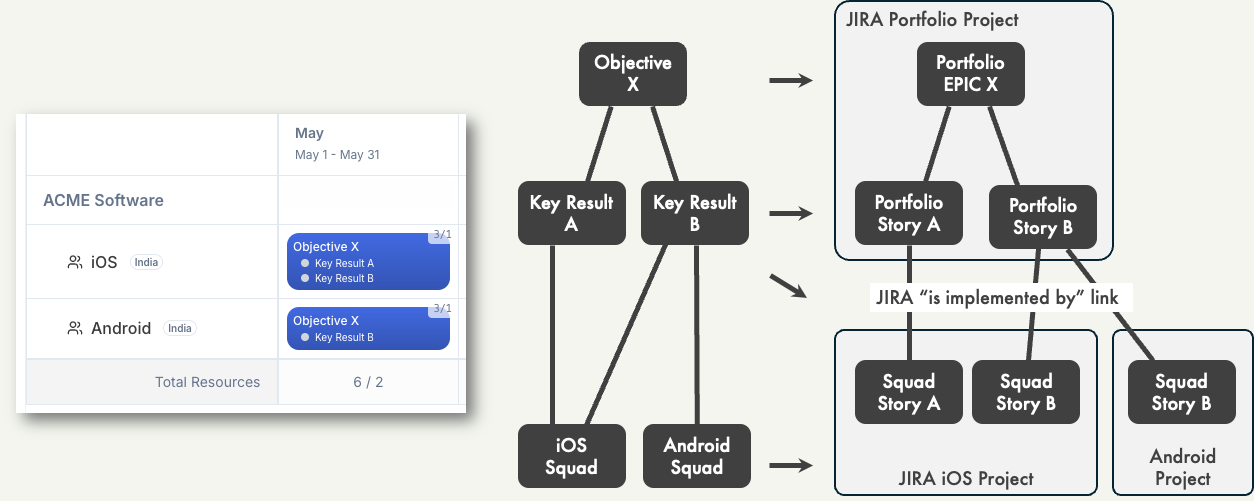 Diagram showing how RoadmapOne Objectives and Key Results map to JIRA Portfolio Epics, Portfolio Stories, and Squad Stories, connected via “is implemented by” links
Setting Up the Integration
Getting started takes just a few minutes. In your workspace settings, you’ll configure your JIRA Cloud instance by providing your JIRA URL, your Portfolio project key (where strategic Epics and Stories will live), and an API token for authentication. RoadmapOne encrypts this token before storing it, so your credentials remain secure.
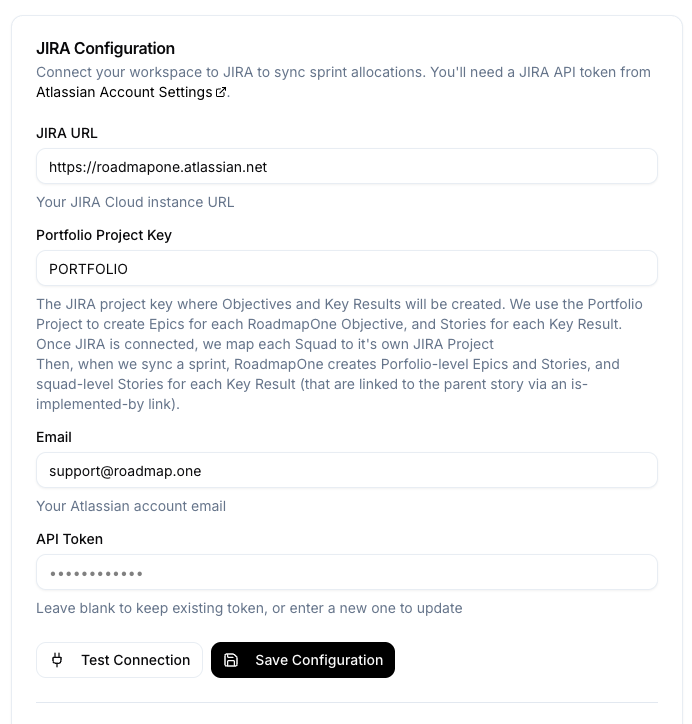 Screenshot of the JIRA Settings page showing configuration fields for JIRA URL, Portfolio Project, and authentication credentials, with a “Test Connection” button
Once your workspace is connected to JIRA, you can configure each squad individually with their specific JIRA project and preferred story type. Some squads might use “Story” in a Scrum project, while others prefer “Task” in a Kanban board. The integration adapts to however your teams work, rather than forcing everyone into a single workflow.
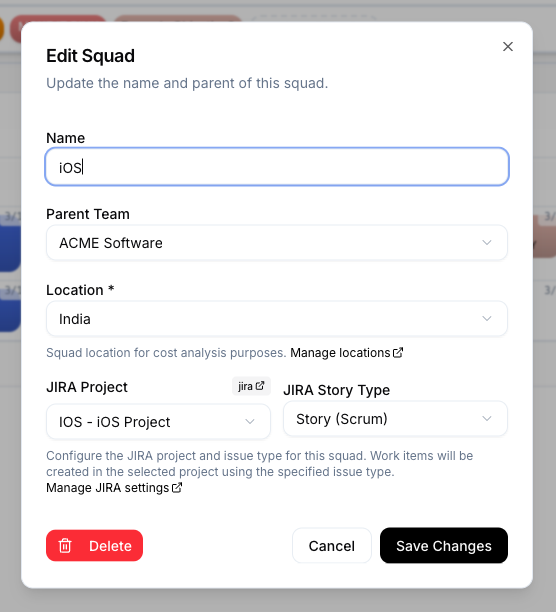 Screenshot of the Edit Squad modal showing JIRA Project dropdown and Story Type selection (Story, Task, Bug, Subtask), with a small “jira” badge that opens a new JIRA window containing the default project view. Yeah, Projects are called Spaces now but I’m old school.
Syncing Your Roadmap to JIRA
When you’re ready to sync work to JIRA, simply right-click any sprint header and select “Sync Sprint to JIRA.” Before making any changes, RoadmapOne shows you exactly what will be created—new Epics for objectives that don’t exist yet, new Portfolio Stories for Key Results, and new Squad Stories for each allocation. You can review everything, check for configuration issues, and only proceed when you’re satisfied.
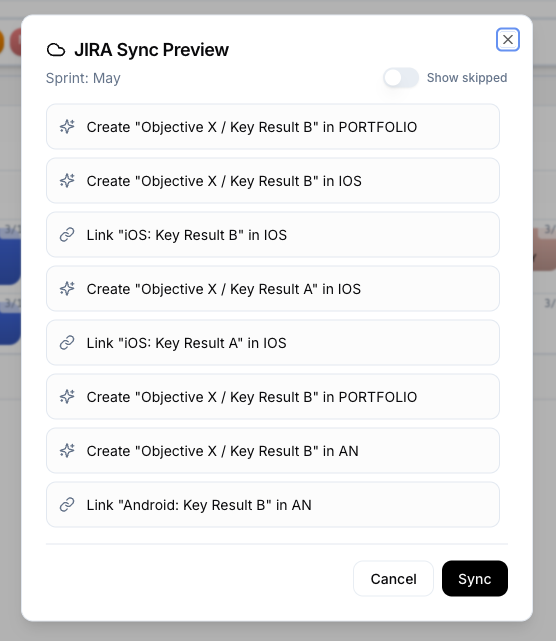 Screenshot of the sync preview modal showing a list of actions: “Create Epic for Objective X in PORT”, “Create Story for Key Result Y in PORT”, “Create Squad Story in MOBILE”, with configuration warnings highlighted in orange if squads aren’t properly configured
The sync happens sequentially, creating Epics first, then Portfolio Stories, then Squad Stories, ensuring all the parent-child relationships are established correctly. You see real-time progress as each item is created, and if anything fails—maybe a squad’s project key was mistyped—you get immediate feedback with the specific error from JIRA, so you can fix it and re-sync just that item.
Living Links to JIRA
Once items are synced, small “jira” badges appear throughout RoadmapOne, providing instant access to the JIRA issues without leaving your roadmap. Click the badge next to an objective name and jump straight to the Epic in JIRA. Click the badge next to a Key Result and view the Portfolio Story. In the Allocation Modal, you’ll see badges for both the high-level Epic and the specific Squad Story created for that squad’s work.
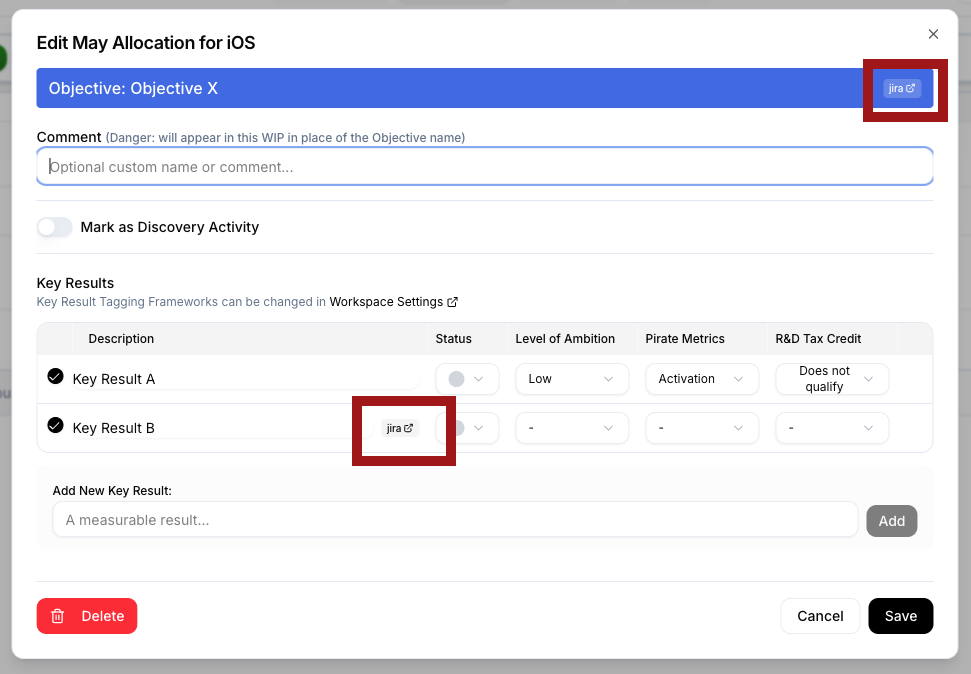 Screenshot of the Allocation Modal showing the objective name with a “jira” badge that links to the Jira objective in the Portfolio, and each Key Result in the table with its own “jira” badge linking to the Squad Story
These links are incredibly useful when stakeholders ask “where can I see this work in JIRA?” or when you need to check the detailed progress on a specific Key Result. The issue keys are stored in RoadmapOne’s database and update in real-time for everyone on your team—as soon as someone syncs a sprint, the badges appear for all workspace members instantly, thanks to RoadmapOne’s real-time collaboration features.
The Benefits of Connecting Strategy to Execution
The JIRA integration transforms how product and engineering teams work together. Instead of roadmap reviews becoming archaeology expeditions where everyone tries to figure out how the strategic plan relates to current sprints, you have a single source of truth that flows naturally from strategic intent to detailed implementation.
For product leaders, this means you can finally answer questions like “what percentage of our engineering capacity is going to technical debt versus new features?” or “are we actually staffing our top-priority objectives, or are they being crowded out by everything else?” RoadmapOne’s analytics already show you this at the strategic level, and now that data reflects what’s actually in JIRA, not just what you hoped would happen.
For engineering managers, this eliminates the dreaded “roadmap tax”—that endless cycle of updating both your roadmap tool and JIRA, only to have them drift apart again by next week. When leadership makes a change in RoadmapOne (swapping an objective between squads, or shifting priorities across quarters), you can simply re-sync and JIRA reflects the new reality. You spend less time on administrative overhead and more time helping your teams deliver.
For individual contributors, this provides clarity on why they’re building what they’re building. When an engineer opens a Squad Story in JIRA, they can click through to the Portfolio Epic and see the strategic objective, complete with tags showing whether this is a customer-facing feature, infrastructure work, or technical debt paydown. That context helps teams make better micro-decisions throughout development, because they understand the larger goal they’re serving.
For stakeholders, this creates unprecedented visibility into how strategy translates to execution. The CFO who wants to understand how much you’re investing in compliance versus growth can see the strategic allocation in RoadmapOne, then drill down to the actual JIRA Epics to understand the work in detail. The head of customer success who’s wondering when a promised feature will ship can see exactly which squad has it in their backlog, in which sprint, and how many story points remain.
Beyond the Initial Sync
The real power of the integration emerges over time. As your organization’s priorities shift—and they always do—you update your roadmap, re-sync the affected sprints, and JIRA stays in sync with minimal effort. When you need to scenario plan (what if we allocated two squads to this objective instead of one?), you can clone your roadmap, try different allocations, and see exactly what the resulting JIRA structure would look like before committing.
The integration respects your team’s autonomy at the execution layer. RoadmapOne creates the strategic scaffolding in JIRA—the Epics and high-level Stories—but it doesn’t prescribe how squads break down their Squad Stories into subtasks, how they estimate effort, or how they manage their sprint-to-sprint execution. Those decisions remain in the hands of the teams doing the work, where they belong.
At the same time, the integration provides just enough structure to prevent chaos. Every Squad Story is linked back to its strategic parent, so you never lose sight of why you’re doing the work. Every Epic contains the context that helps teams make good decisions independently. And every time you sync, you’re reinforcing the connection between strategy and execution, ensuring they never drift too far apart.
Getting Started Today
If your organization uses JIRA Cloud and you’re tired of the constant struggle to keep your roadmap aligned with reality, the integration is ready to use today. Configure your JIRA settings in a few minutes, map your squads to their JIRA projects, sync your first sprint, and experience what it feels like when strategic planning and execution finally work together instead of against each other.
The integration works with your existing JIRA structure—you don’t need to reorganize your projects, retrain your teams, or change your workflows. RoadmapOne adapts to how you work, creating issues in the right places with the right metadata, and getting out of the way so your teams can focus on shipping.
Your roadmap should be more than a slide deck that gets presented once a quarter and forgotten. It should be a living tool that guides daily decisions, reflects current reality, and helps everyone understand how their work contributes to organizational goals. With RoadmapOne’s JIRA integration, that’s exactly what it becomes.
Ready to connect your roadmap to your backlog? Configure JIRA integration in your workspace settings, or contact our team for help getting started.